
How do I turn confirmation emails into an itinerary?
Forward or upload each confirmation email to Reveldays. It reads the dates, times and place, and builds them into a day-by-day itinerary for the right trip — no copy-pasting into a document.
Turn flight, hotel and car confirmation emails into one costed itinerary automatically — forward them to Reveldays and skip the retyping.
The manual way, and why it's slow
Building an itinerary by hand usually means opening each confirmation, copying the flight time or check-in date, and pasting it into a document or spreadsheet in the right order. It works, but it takes real time and it's easy to miss a detail or lose track when a booking changes.
Turning an email into a timeline automatically
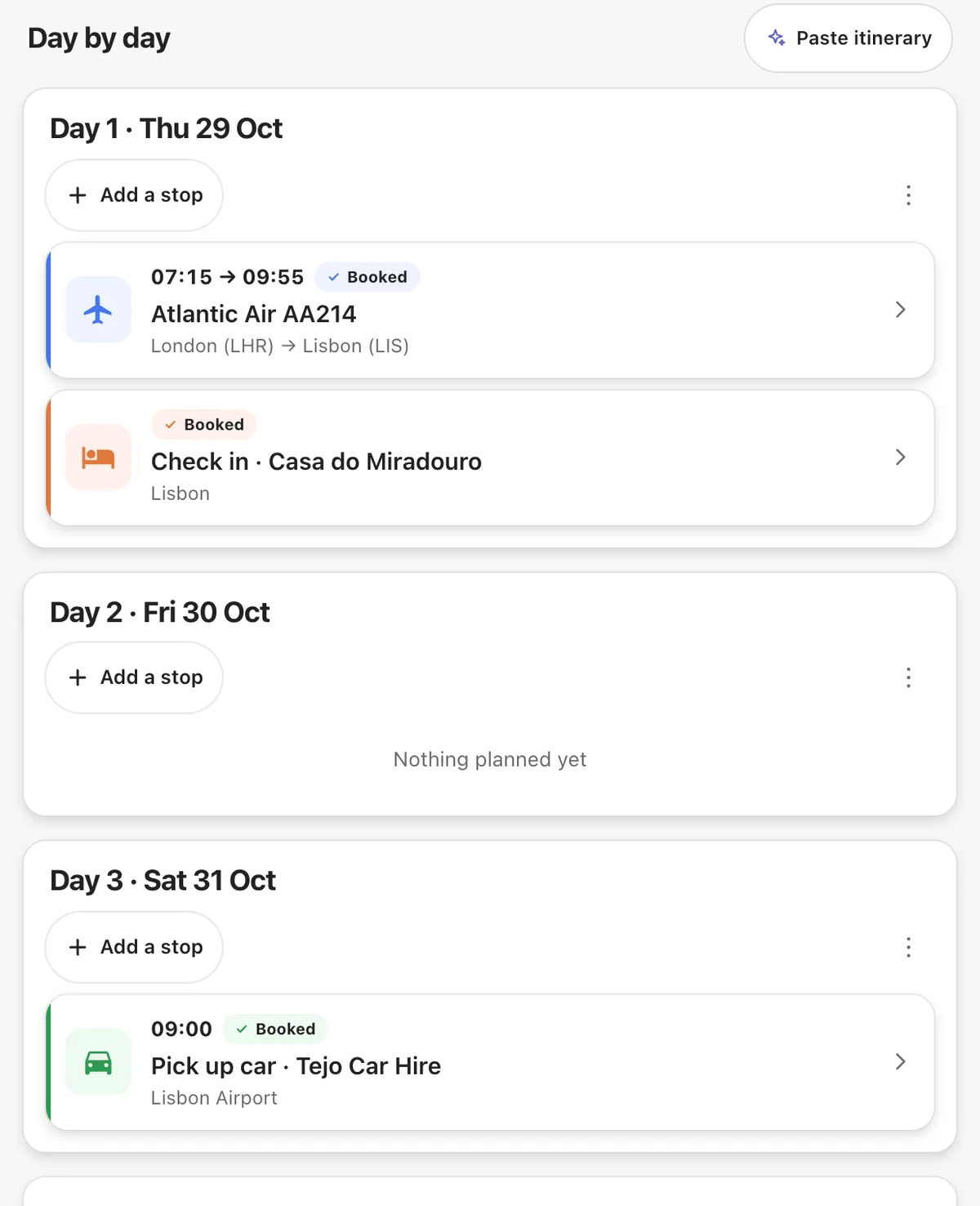
Reveldays reads the same details you'd copy by hand — dates, times, place, confirmation code — directly from the email or a PDF you upload, and places the booking on your trip's day-by-day timeline. A flight becomes a day with an arrival time; a hotel becomes the nights you're staying.
What you get beyond a plain list
Because every booking lands in the same place, the itinerary is also costed and mapped: each day shows what's confirmed, roughly what it cost, and where it happens. You can see gaps too — a day with nothing booked stands out on its own.
How Reveldays does it
Forward a booking confirmation to your Reveldays import address, or upload the PDF. It's read, matched to the right trip, and placed on the day it happens — building your itinerary one email at a time.
Questions
- Does it work with any airline or hotel site?
- It reads the confirmation email itself, so it isn't tied to one airline or booking site — forward whatever confirmation you were sent.
- What if a booking changes after I forward it?
- Forward the updated confirmation and Reveldays re-reads it. You can also re-check an email if the details didn't come through right the first time.
- Can I add something that wasn't booked by email, like a train ticket I bought in person?
- Yes — you can add a booking by hand for anything that never arrived as an email.
Ready when you are.
Checked 19 September 2026.
Reveldays makes these pages.
Keep reading
- How do I keep all my travel bookings in one place?Forward each booking confirmation email to Reveldays. It reads the flight, hotel, car or reservation, works out which trip it belongs to, and files it there automatically — free, with no limit.
- Why isn't Gmail adding my flights to my calendar?Gmail's automatic calendar events only trigger for confirmation emails in a format Google recognises, from a limited set of airlines and booking sites. A forwarded, reformatted, or unusual confirmation often doesn't qualify, so nothing appears.
- Free AI trip plannerDescribe the trip; get days, costed and mapped.